Ali started using Excel for school. His teacher said, “Put the names in a column and the scores in a row.”
Ali got confused.
Many people do.
The difference between columns and rows can seem hard at first. Both appear in tables, spreadsheets, and databases. Because they work together, people often mix them up.
Learning the difference between columns and rows is useful. It helps you use Excel, Google Sheets, and other tools. It also helps you organize information the right way.
In this guide, you will learn the difference between columns and rows in a simple way. You will also see easy examples that help you remember them.
What is “Columns”?
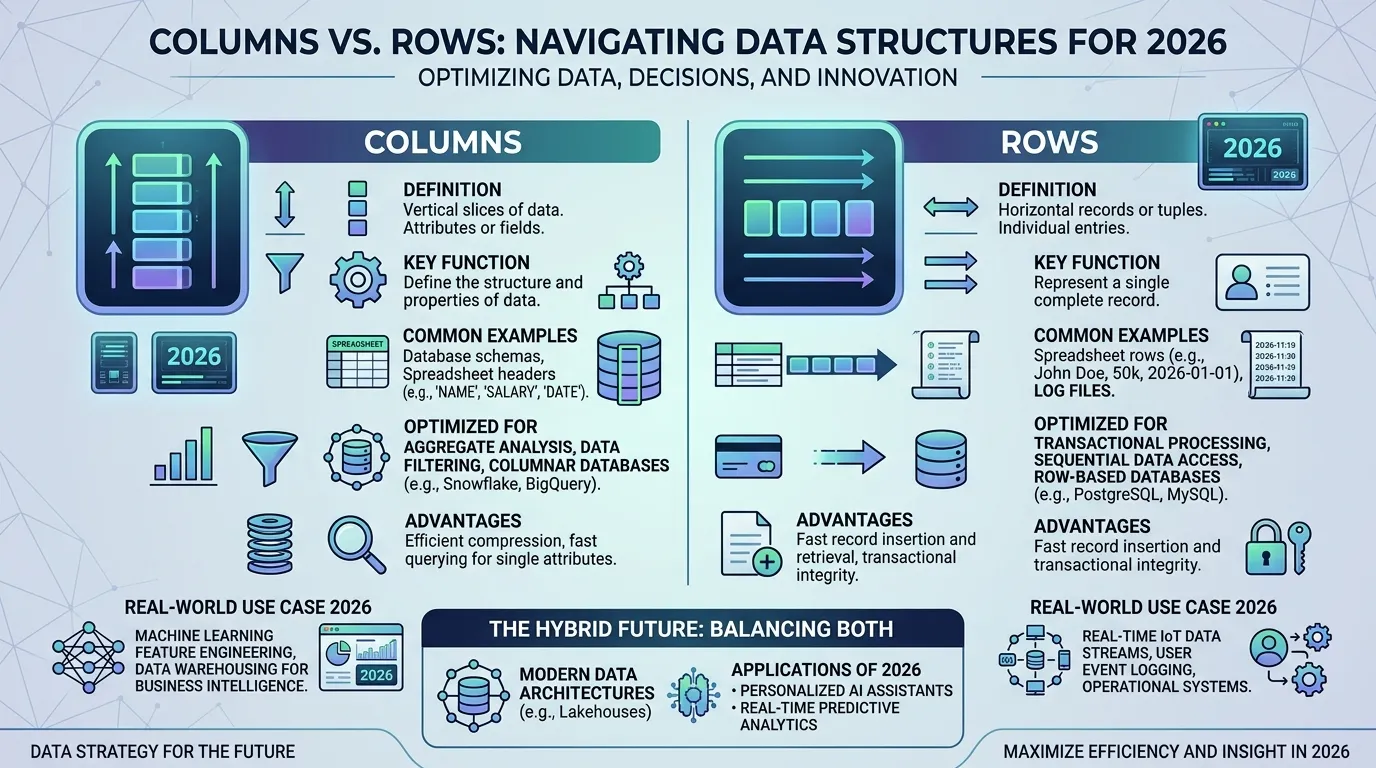
A column is a vertical line of cells.
It goes from top to bottom.
Columns usually hold one type of information.
For example, a Name column may contain many names.
History of Columns
The word “column” comes from old architecture. A column was a tall pillar that helped support a building. Ancient people used columns in temples, palaces, and public buildings. Over time, people started using the word for anything arranged in a vertical way. Newspapers used columns for text. Later, spreadsheets and databases used columns to organize information. Today, a column means a vertical set of cells in a table or spreadsheet. The idea is still the same. A column stands upright, just like a pillar in a building.
What is “Rows”?
A row is a horizontal line of cells.
It goes from left to right.
Rows usually hold a complete set of information.
For example, one row may contain a student’s name, age, and grade.
History of Rows
The word “row” has been used in English for hundreds of years. It originally meant a line of things placed side by side. People talked about a row of houses, a row of trees, or a row of seats. Later, the word became common in tables and spreadsheets. In these tools, a row means information arranged across the page from left to right. Today, rows are used in schools, offices, and businesses around the world. The meaning remains simple: a row is a line that goes across.
Columns vs Rows
Column: A vertical group of cells.
Row: A horizontal group of cells.
Now let’s look at how each one works and why they are different.
How Columns Work
Key Features
- Go from top to bottom
- Usually contain one type of data
- Use letters in Excel
- Help organize categories
Examples
🔵 The Name column contains student names.
🔵 The Salary column contains employee salaries.
Uses
- Spreadsheets
- Databases
- Reports
- School projects
- Office work
How Rows Work
Key Features
- Go from left to right
- Hold complete records
- Use numbers in Excel
- Help organize entries
Examples
🟢 Row 5 contains one student’s details.
🟢 Row 10 contains one employee’s record.
Uses
- Spreadsheets
- Databases
- Attendance sheets
- Business reports
- Data entry
Which One Should You Use?
Use columns when talking about categories of information.
Use rows when talking about complete records or entries.
10 Differences Between Columns and Rows
1. Direction
Columns: Move up and down.
🔴 Column A goes down.
🔴 The names are listed downward.
Rows: Move across.
🔴 Row 1 goes across.
🔴 The data moves left to right.
2. Shape
Columns: Look tall.
🔴 A column looks like a pillar.
🔴 A newspaper column is vertical.
Rows: Look wide.
🔴 A row of seats stretches across.
🔴 A row looks horizontal.
3. Excel Labels
Columns: Use letters.
🔴 Column A contains names.
🔴 Column B contains scores.
Rows: Use numbers.
🔴 Row 1 contains headings.
🔴 Row 2 contains data.
4. Purpose
Columns: Organize categories.
🔴 Name is a column.
🔴 Age is a column.
Rows: Organize records.
🔴 Ahmed’s details are in one row.
🔴 Sara’s details are in one row.
5. Data Type
Columns: Hold similar data.
🔴 Age column contains ages.
🔴 City column contains cities.
Rows: Hold mixed data.
🔴 One row has name and age.
🔴 One row has city and phone number.
6. Database Meaning
Columns: Are called fields.
🔴 Name field.
🔴 Email field.
Rows: Are called records.
🔴 Customer record.
🔴 Student record.
7. Sorting
Columns: Are often sorted.
🔴 Sort by age.
🔴 Sort by salary.
Rows: Show results after sorting.
🔴 Student rows move.
🔴 Employee rows move.
8. Identification
Columns: Identify data types.
🔴 Name column.
🔴 Address column.
Rows: Identify individual entries.
🔴 Customer row.
🔴 Product row.
9. Reading Data
Columns: Show one category.
🔴 Read all names.
🔴 Read all scores.
Rows: Show one record.
🔴 Read one student’s details.
🔴 Read one employee’s details.
10. Memory Trick
Columns: Like pillars.
🔴 Pillars stand up.
🔴 Columns stand up.
Rows: Like roads.
🔴 Roads go across.
🔴 Rows go across.
Why People Get Confused About Their Use
People confuse columns and rows because both appear together in tables. They also help organize information. Beginners often look at the data and forget to check the direction. This makes it easy to mix them up.
Table: Difference and Similarity
| Feature | Columns | Rows | Similarity |
| Direction | Vertical | Horizontal | Both organize data |
| Excel Label | Letters | Numbers | Both identify cells |
| Purpose | Categories | Records | Both store information |
| Shape | Tall | Wide | Both appear in tables |
| Database Term | Field | Record | Both are database parts |
Which is Better in What Situation?
Columns are better when you want to group the same type of information together. For example, names, ages, and phone numbers are often stored in separate columns. This makes data easy to sort and analyze.
Rows are better when you want to see all information about one person or item. For example, one row can show a customer’s name, phone number, and address together. This makes records easy to read.
How Are “Columns” and “Rows” Used in Metaphors and Similes?
🟣 A column is like a tall tree standing straight.
🟣 A column is like a building pillar.
🟣 A row is like a road stretching ahead.
🟣 A row is like a line of chairs.
Connotative Meaning
Columns
Positive: Organized, structured
Neutral: Vertical arrangement
🟣 “The report used clear columns.”
Rows
Positive: Orderly, neat
Neutral: Horizontal arrangement
🟣 “The chairs were placed in rows.”
Idioms or Proverbs
There are no common English idioms that directly use “column” or “row” in the spreadsheet sense.
Related expressions include:
🟣 “Stay in line” = Follow rules.
Example: “Students stayed in line during assembly.”
🟣 “Line things up” = Arrange properly.
Example: “Line up the data in rows.”
Works in Literature
🟣 Bleak House — Bleak House (1853)
🟣 Hard Times — Hard Times (1854)
These books contain descriptions of rows of houses and columns in buildings.
Movies Related to the Keywords
🟣 Hidden Figures (2016, United States)
🟣 The Accountant (2016, United States)
These movies involve numbers, tables, and organized data.
Frequently Asked Questions
1. What is the main difference between columns and rows?
Columns go up and down. Rows go left and right.
2. Are columns vertical?
Yes. Columns run from top to bottom.
3. Are rows horizontal?
Yes. Rows run from left to right.
4. What do columns use in Excel?
Columns use letters such as A, B, and C.
5. What do rows use in Excel?
Rows use numbers such as 1, 2, and 3.
Final Words
Learning rows and columns is easier than many people think. Once you know their direction, you can identify them quickly. Keep practicing with tables and spreadsheets. Soon, using the correct term will feel natural.
Conclusion
The difference between columns and rows is simple. Columns run from top to bottom and usually contain one type of information. Rows run from left to right and usually contain one complete record. Both are important for organizing data in spreadsheets, databases, and reports. A simple way to remember them is this: columns are like pillars, and rows are like roads. Once you understand the difference between columns and rows, working with tables becomes much easier.

I’m Zahid Abbas, an educator, researcher, and digital publishing strategist with a passion for linguistics, grammar, and clear communication. As a content creator and SEO specialist, I craft research-driven, reader-focused content that empowers learners and makes knowledge accessible worldwide.